 LOWKEY AUDIO ENGINE
Download Engine
Get the latest version of Lowkey Audio Engine for your system.
macOS
Version 1.0.0 | Universal BinaryNative support for Apple Silicon (M1/M2/M3) and Intel processors. Requires macOS 11.0 Big Sur or later.
Coming soon...Windows
Version 1.0.2 | 64-bitOptimized for Windows x64 architecture. Requires Windows 10 or Windows 11.
Download .exeBy downloading this software, you agree to our Terms of Service.
Windows Installation
Follow these quick steps to safely get Lowkey Audio Engine up and running on your system.
Why might you see a warning? Lowkey Audio Engine executes all processing entirely locally on your hardware. Because we are an independent development studio with a newly launched binary, Microsoft Windows SmartScreen has not yet built up an automated "reputation history" for our app installer. This temporary flag is standard for new standalone software utilities.
Launch the Installer
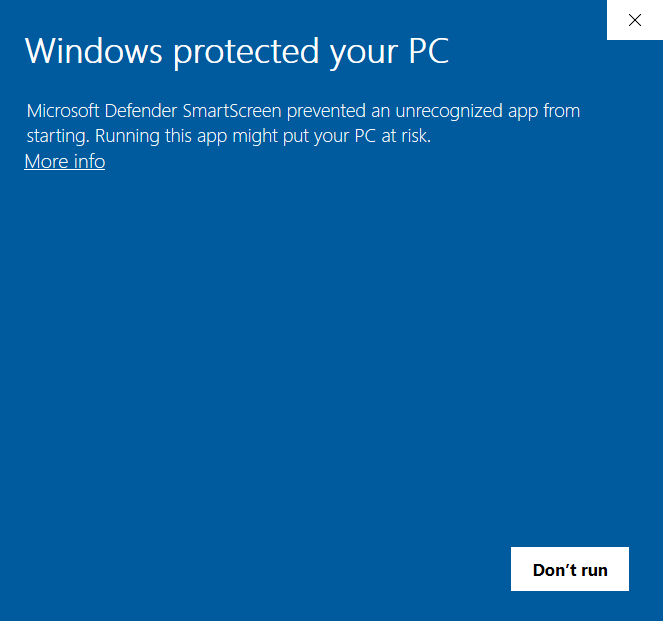
Locate the downloaded lowkey_audio_engine_vX.X.X_Setup.exe file on your computer and double-click to run it. If Windows SmartScreen blocks execution, a blue alert window will appear stating "Windows protected your PC."
Click "More Info"
On the blue SmartScreen prompt block, click on the small text labeled "More info" directly right underneath the main header message. This will expand the window to show the application metadata details.
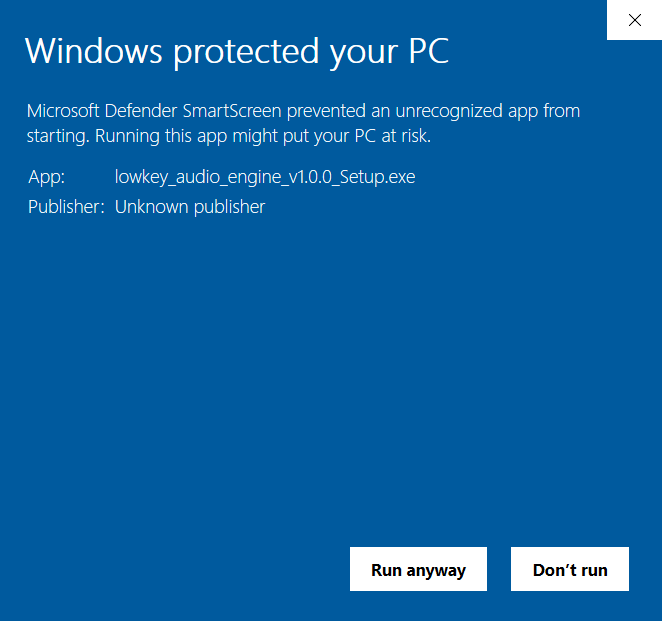
Select "Run Anyway"
Once expanded, a new option button labeled "Run anyway" will appear at the bottom of the pop-up window. Click it to launch our safe local installation wizard and begin loading your application.
System Requirements
RAM: 4 GB minimum (8 GB recommended for large libraries)
Network: Internet connection required for initial activation